
Oasis
MixtilesHouse & Home
4.970.00 Reviews
- Version
- 3.0.0
- Installs
- 10.00K
- Age Rating
- Everyone
Screenshots
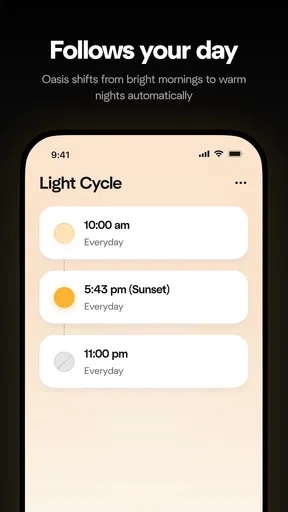
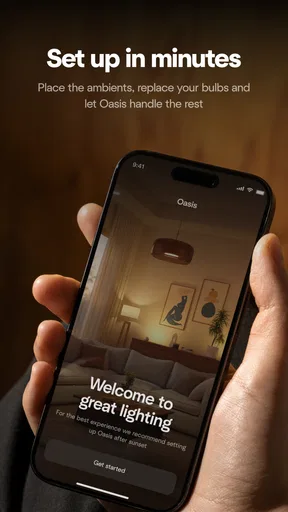
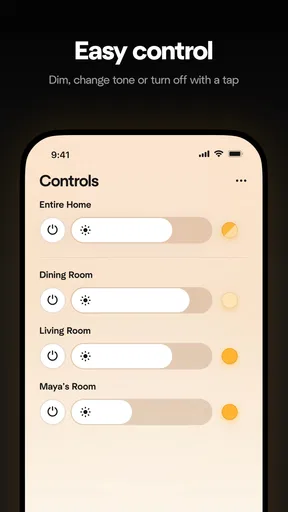
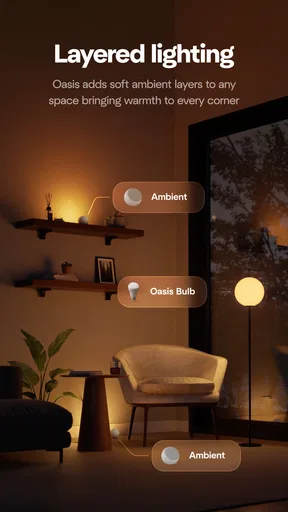

Our Review of Oasis
 Analysis by Appyee
I approached Oasis as the kind of app you open when a physical Oasis product needs attention, not as a general smart-home dashboard. Its purpose is straightforward: it helps control the various Oasis products. That narrow focus is important, because the experience makes the most sense when you already own compatible Oasis hardware and want one place to interact with it.
The app comes from Mixtiles, is free to install, and sits in the House & Home category. It is suitable for everyone, and the current release is version 2.8.0. I also found it approachable enough for ordinary household use rather than something aimed only at technically confident users. The store page shows a 5.0 average from about 189 ratings, with more than 10K installs, so its audience is still relatively focused compared with large, all-purpose home-control apps.
From a household need to a controlled Oasis product
When I think about the path from a household need to Oasis, I start with a practical question: which product do I want to control, and would using my phone make that task easier? That framing keeps the app’s role clear and helps me judge its usefulness by the everyday steps it removes, rather than by expecting it to manage an entire home.
Starting with the right expectation
The first thing I would tell a friend is not to download Oasis expecting a universal controller for lights, thermostats, cameras, plugs, and appliances from different brands. Its value is tied to Oasis products. That makes the starting condition simple: you have an Oasis device or devices, and you want a dedicated mobile control point instead of relying on a physical control or a collection of disconnected actions.
That focused approach can be a strength. A broad smart-home app often asks you to sort through rooms, brands, device types, scenes, and integrations before you reach the control you actually need. Oasis has a more direct reason for existing. When the household problem is “I need to manage my Oasis product,” a dedicated app should feel less cluttered than a platform built to manage an entire connected home.
It also means the app is not automatically useful to everyone. If you do not own an Oasis product, there is little reason to keep it installed. If your home is built around another ecosystem, a wider app may be a better center of control. I see Oasis as a companion rather than a replacement for every other home-management tool.
The first practical handoff: from product to phone
The real workflow begins outside the screen. You start with the physical Oasis product, then move to the phone and use the app as the control layer. That handoff matters because the app cannot be judged only by how its menus look. A control app succeeds when the transition from “I am standing near the product” to “I can manage it from the phone” feels understandable.
For a first-time user, I would keep the product nearby while opening Oasis. That simple habit reduces confusion: if the app asks you to identify or connect to a product, you can immediately match what appears on the screen with what is in front of you. It is also easier to notice whether the app is controlling the intended item when several Oasis products are present in the same home.
I would avoid trying to set everything up while rushing out the door. A dedicated controller is most useful when its initial handoff is done calmly. Once the relationship between the phone and the product is clear, everyday control should become a shorter task. If you skip that orientation step, even a simple app can feel more complicated than it really is.
Moving through the control flow
After opening the app, the useful question is not “What can this app do in general?” but “Which Oasis product am I trying to control right now?” That product-first mindset helps keep the workflow clean. I would select the relevant item, check that it is the one I intended to use, and then make the needed adjustment rather than exploring every screen without a specific goal.
This is especially helpful in a shared home. A person may open the app to make a quick change, while someone else may already be using the physical product. Deliberately confirming the selected product is a small but worthwhile safeguard. It prevents the common smart-home mistake of acting on the wrong room or device simply because two names look similar.
My practical tip is to treat the app as a short sequence: open it, identify the product, make one change, and check the result. That sounds obvious, but it creates a reliable habit. It also exposes friction quickly. If a basic adjustment requires repeated searching, the problem is not your memory; the app is adding too many steps to a task that should be immediate.
When more than one person needs access
The next handoff is between the app and the people in the household. A home-control app is rarely used by only the person who first installs it. Someone may want to make an adjustment from a different room, while another person may prefer the physical controls. Oasis works best when everyone understands what role the phone has in relation to the product.
I would introduce it to another household member by showing the shortest useful path rather than explaining every available screen. Demonstrate how to reach the relevant Oasis product and how to confirm the outcome. That is more practical than handing over the phone with no context, especially for someone who does not enjoy learning new home technology.
This is also where expectations need to stay realistic. A dedicated controller does not automatically solve household coordination. If several people change the same product at once, the app is only one part of the situation. Clear naming and a quick visual check remain useful, particularly when the phone is being used away from the product.
A realistic everyday scenario
Imagine that I am preparing the living area in the evening and want to adjust an Oasis product without walking back and forth to it. I open Oasis, locate the relevant product, make the change, and then look at the physical result. The outcome I want is not a complicated automation; it is a small improvement in convenience that removes an unnecessary trip across the room.
Another realistic use is checking a product before settling down for the night. The app gives me a dedicated place to begin that check instead of making me remember which broader smart-home platform contains the control. The benefit is modest but genuine: fewer mental steps and less hunting through unrelated devices.
For a household with several Oasis products, the same workflow becomes more valuable because the phone can serve as a common control point. The trade-off is that organization becomes more important. If products are difficult to distinguish, the convenience of central control is weakened by the risk of selecting the wrong one.
What the result feels like
The best result from Oasis is not an impressive dashboard; it is a completed household action with minimal uncertainty. I want to know that I selected the intended Oasis product, made the desired adjustment, and can see or otherwise recognize the result. A focused app earns its place when it shortens that path.
I also appreciate that the app is free. That lowers the barrier for someone who already owns compatible Oasis hardware and wants to try the official control option before looking for alternatives. The free price does not by itself guarantee a perfect experience, but it makes experimentation less risky.
The 5.0 average shown by the store is encouraging, and the number of reviews is substantial enough to suggest that users have shared real reactions rather than the score being based on only a handful of opinions. I still would not treat a high rating as proof that every household will have the same experience. A controller can be excellent for one product setup and less convenient for another, especially when homes differ in layout and the number of devices involved.
Where the flow can break
The main weakness is the app’s dependence on the Oasis product ecosystem. If you want one application to control products from many manufacturers, Oasis is likely to feel too limited. A broader home platform may be better for mixed-brand households, even if it takes longer to configure. The choice depends on whether you value focused control or wider compatibility.
The second possible friction point is the handoff between the physical product and the phone. Any moment of uncertainty about which product is selected can undermine confidence. My advice is to use clear, recognizable names and verify the physical outcome after an important change. That is particularly worthwhile when several similar products are installed.
A third limitation is that a phone is not always the fastest control method. If I am already next to the Oasis product, a physical control may be more immediate. Oasis becomes more useful when the phone offers a meaningful convenience: controlling the product from another part of the home, keeping several products in one place, or avoiding repeated trips.
I would also think about who in the household needs to use it before making the app the only control method. Someone comfortable with a physical interface may not want to depend on a phone for every small adjustment. The strongest arrangement is often complementary: the app for convenient remote interaction within the home, and the product’s direct controls for quick hands-on use.
Who should install it, and who should skip it
I recommend Oasis to people who own Oasis products and want a straightforward companion app from Mixtiles. It is especially suitable for users who prefer a dedicated experience over a large smart-home platform filled with controls they never touch. It can also suit households where more than one person needs a consistent way to reach the same products.
I would skip it if you are only looking for a general home-automation hub, if your devices belong to unrelated brands, or if you do not expect to use phone-based control. In those cases, a broader alternative or the products’ direct controls may be more sensible. Installing a dedicated companion app without compatible hardware is unlikely to add value.
For anyone concerned about age suitability, the Everyone rating makes the app broadly accessible as a household utility. The minimum operating-system requirement is Android 7.0, which keeps it available to many older Android phones. That is useful for families who do not replace devices frequently, although the actual comfort of use will still depend on the phone’s screen, speed, and general condition.
My final take after following the whole workflow
Oasis is easiest to understand as a focused bridge between a Mixtiles product and the person using it. Its journey starts with a physical household need, moves through product selection and phone control, passes between household members, and ends when the physical result is clear. That workflow is more important than a long feature list because it shows exactly where the app earns its place.
My recommendation is simple: install Oasis when you already use Oasis products and want their controls gathered in one dedicated app. The free entry point, Everyone rating, current 2.8.0 release, and strong visible user score make it an easy companion to try. Just keep its boundaries in mind. It is not the right answer for a mixed-brand smart home, and it should not replace a direct control method when that is faster.
In my experience, the app’s success comes from keeping the task narrow. Open it with a specific product and a specific outcome in mind, verify the handoff, and check the physical result. Used that way, Oasis can remove small bits of daily friction without asking you to redesign the way your whole home works.
Privacy and Permissions
See what permissions an app requests and how it handles your data.
- Location
- approximate location (network-based), precise location (GPS and network-based)
- Photos/Media/Files
- read the contents of your USB storage, modify or delete the contents of your USB storage
- Storage
- read the contents of your USB storage, modify or delete the contents of your USB storage
- Microphone
- record audio
- Wi-Fi connection information
- view Wi-Fi connections
- Other
- view network connections, pair with Bluetooth devices, access Bluetooth settings, full network access, control vibration, prevent device from sleeping
Verdict
Strengths of Oasis
- Simple, calming interface that is easy to navigate from the first launch.
- Useful tools for building healthier digital habits without feeling overly restrictive.
- Clean visual design makes the app pleasant to use for longer sessions.
- Progress tracking helps users notice improvements and maintain motivation.
- Works well for short daily check-ins and quick moments of mindfulness.
Limitations of Oasis
- Some of the most useful features may require a subscription or in-app purchase.
- Limited customization can make the experience feel repetitive over time.
- Progress insights may be too basic for users wanting detailed statistics.
- Certain features depend on notifications, which can be easy to dismiss or miss.
- The app may feel slow-paced for users seeking more interactive activities.
Similar Picks in This Category
View All
Universal TV Remote Control
CodeMatics Media Solutions3.9

AlfredCamera Home Security app
Alfred Systems Inc.4.7

Planner 5D: AI Home Design
Planner 5D4.5

Universal Tv Remote-Cast to TV
One Music Player4.1

Zillow: Homes for Sale & Rent
Zillow Group4.8

99acres Buy/Rent/Sell Property
infoedge.com4.3
Frequently Asked Questions
What is Oasis, and what can I use it for?
Oasis is an app designed to provide a focused digital experience around its main tools and content. Depending on the version and platform, it may help you organize information, access useful features, or enjoy its interactive services in one place. Before downloading, check the official store description to confirm the current functions, supported devices, and regional availability.
Is Oasis free to download and use?
Oasis can generally be downloaded from the official Android or iOS store without an upfront charge, but some features may require in-app purchases, a subscription, or additional payments. Review the pricing section carefully before creating an account or starting a trial. Also check whether subscriptions renew automatically and learn how to cancel them through your device settings.
Does Oasis require an account or personal information?
The information required by Oasis depends on how its features work. Some functions may be available immediately, while others can require an email address, profile, or sign-in through a supported service. Before registering, review the permissions and privacy policy so you understand what data may be collected, why it is needed, and whether you can use the app with limited personal information.
Can I use Oasis offline, or does it need an internet connection?
Oasis may need an internet connection for downloading content, synchronizing information, signing in, receiving updates, or using online features. Certain parts may continue working offline if the app stores data locally, but this should not be assumed for every tool. If you plan to use Oasis while traveling, test the features you need before leaving a reliable connection.
Is Oasis safe and compatible with my phone?
Download Oasis only through its official Google Play Store or Apple App Store listing to reduce the risk of installing an altered or unsafe version. Check the developer name, recent update history, ratings, privacy details, and required permissions before installing. Compatibility can vary by operating-system version, device model, and available storage, so confirm the listed requirements first.
